# Avatar編輯器

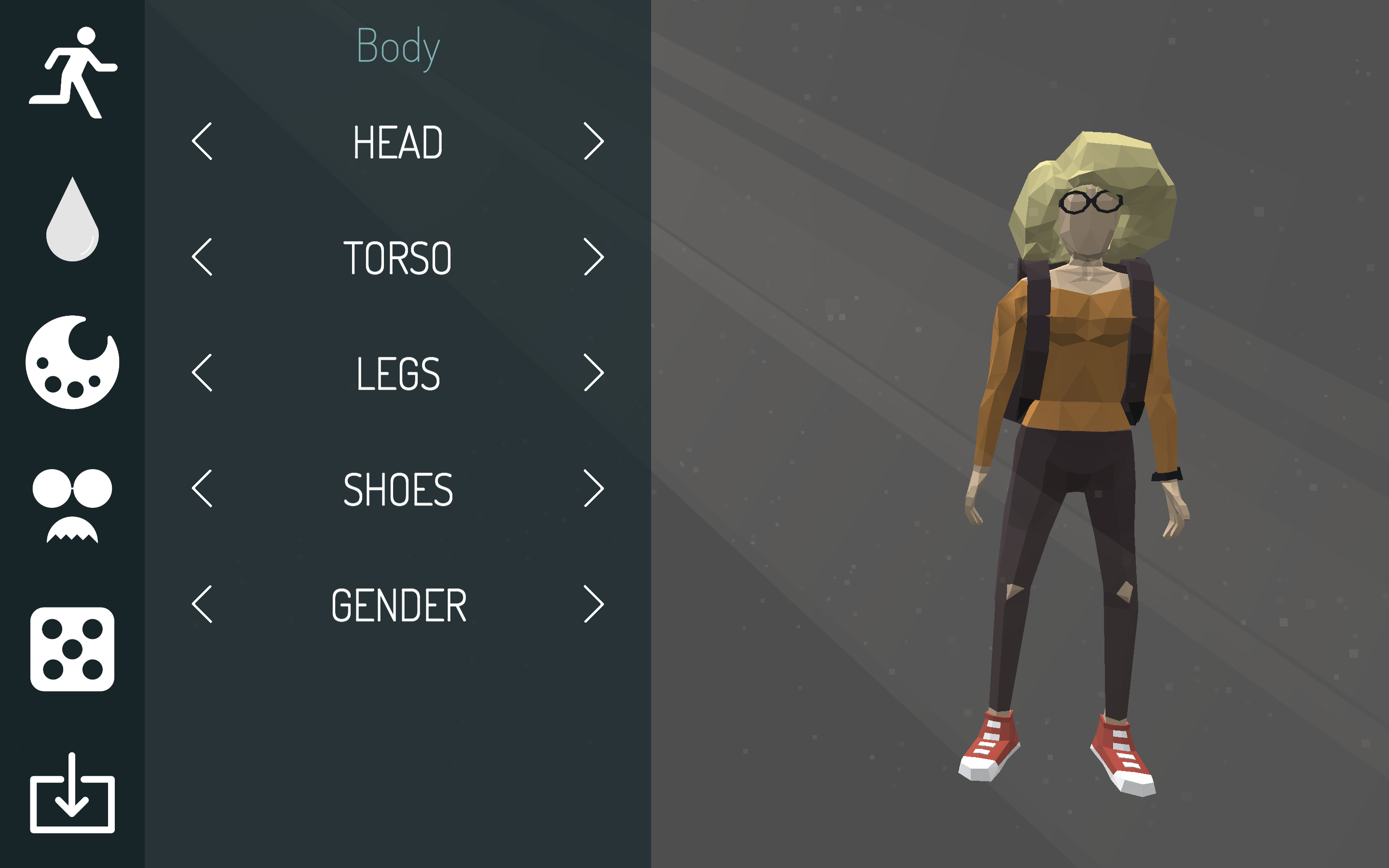
<figure><img src="/files/7SxYjnEulPIv7y6gbtuk" alt=""><figcaption><p>Avatar Editor - 創造鳥分身</p></figcaption></figure>

Avatar編輯器可為用戶根據自己的喜好創建獨一無二的虛擬分身。使用avatar編輯器，用戶可以自訂服飾、配件、膚色等元素，以便創建一個符合自己喜好的虛擬形象。這樣的虛擬分身可以在各種虛擬世界中使用，並且可以作為元宇宙互動及溝通的橋樑，與其他玩家進行交流和互動。

透過avatar編輯器創建的虛擬分身，可以用於參與各種活動和挑戰，例如進行遊戲、參加社交活動、進行虛擬商業交易等。此外，它還可以用於參與POW（Proof of Work）和代幣空頭等活動。透過avatar的參與，用戶可以輕鬆地在虛擬世界中參與各種活動和挑戰，同時也可以獲得不同形式的獎勵和回饋。

#### 此表描述編輯器工具列的項目：

<table><thead><tr><th width="107.33333333333331">功能</th><th width="204">功能</th><th>說明</th></tr></thead><tbody><tr><td><img src="/files/HnHjNg2uUD0GFkk0gh0o" alt=""></td><td>Body 外觀</td><td>虛擬分身的外觀上的編輯，如：頭、手、腳、鞋子、性別的選擇</td></tr><tr><td><img src="/files/If53nGWSE97xwz9TLJeH" alt=""></td><td>Coloring 顏色</td><td>編輯膚色以及服裝顏色</td></tr><tr><td><img src="/files/tH6xrtmS89lTR8xCCMea" alt=""></td><td>Aesthetics 美學顏色</td><td>以美學色盤調色，編輯虛擬分身服飾</td></tr><tr><td><img src="/files/os2GAiNJuZHgLkcDRqE8" alt=""></td><td>Props 配件</td><td>為虛擬分身選擇配件及裝飾如：眼鏡、鬍鬚、手環、後背包</td></tr><tr><td><img src="/files/6lVSMIJ3pNau3EJNoQXw" alt=""></td><td>Random 隨機化</td><td>隨機生成虛擬分身</td></tr><tr><td><img src="/files/I5xWtgC54eRX87i9LuoA" alt=""></td><td>Export 導出</td><td>為您的虛擬分身上架至商城或鑄造為己使用</td></tr></tbody></table>

### 上架商城及鑄造

製作出的虛擬分身可以上架至商城出售或鑄造以供自己使用。將虛擬分身上架至虛擬商城，可以讓其他玩家看到並購買。而將虛擬分身鑄造出來，則可以讓用戶擁有更多的虛擬角色，以便在虛擬世界中進行更多的活動和挑戰。

#### 如何鍛造我的Avatar?

1. 完成虛擬分身編輯後點擊<img src="/files/5NO8mD9f28gkUNgpXIY4" alt="" data-size="line">來導出Avatar
2. 點擊「Capture」來捕捉Avatar近身照直到滿意為止
3. 點擊「Export」即可為您的虛擬分身上架至商城或鑄造為己使用


---

# Agent Instructions: Querying This Documentation

If you need additional information that is not directly available in this page, you can query the documentation dynamically by asking a question.

Perform an HTTP GET request on the current page URL with the `ask` query parameter:

```
GET https://allimeta.gitbook.io/creator-manual/shi-yong-bian-ji-qi-gong-ju/avatar-bian-ji-qi.md?ask=<question>
```

The question should be specific, self-contained, and written in natural language.
The response will contain a direct answer to the question and relevant excerpts and sources from the documentation.

Use this mechanism when the answer is not explicitly present in the current page, you need clarification or additional context, or you want to retrieve related documentation sections.